
When you start using LiFePO4 batteries, the first question that comes to mind is: How much charge is left in the battery? To answer this question, checking the voltage is the most reliable way. But how can you check this voltage? That’s where the LiFePO4 voltage chart comes into the scene. It helps you understand what different voltage readings mean. It gives you an idea of whether the battery is fully charged, half-charged, or running low. But if you are new to this topic, worry not! This guide will help you understand the LiFePO4 voltage chart. So let’s get started.
What is LiFePO4 Battery Voltage?
LiFePO4 battery voltage is the electrical pressure produced by a lithium iron phosphate battery. It shows how much electrical energy the battery delivers over a given period. The voltage changes as the battery charges and discharges. That’s why checking it gives you a general idea of the battery’s charge level.

Basically, a LiFePO4 battery is made up of several cells. The voltage of the individual cell is about 3.2 V. So these cells are connected in a battery to create different voltage levels. It depends on how many cells a battery has. For example, if there is a LiFePO4 battery with 4 cells, then its overall voltage will be 12.8 V. This way, you often see LiFePO4 batteries labeled as 12V, 24V, or 48V.
However, one thing you must know is that the battery voltage does not remain at a single exact number. It rises when the battery is charging and falls as the battery is being used. So this voltage gives you a general idea of how much charge is left. However, you cannot know the exact battery percentage from voltage alone.
LiFePO4 Voltage Chart
A LiFePO4 voltage chart is a reference table that compares battery voltage with state of charge. State of charge is an estimate of how much energy remains in the battery. For example, 100% SOC means the battery is fully charged. Similarly, 50% SOC means half of its usable capacity remains, and so on.
So this chart basically helps you understand what a voltage reading means. For example, it can give you an idea of whether your battery is nearly full, partly charged, or getting low. But keep in mind that there is no single voltage chart that fits every LiFePO4 battery. It changes with the battery manufacturer, temperature, and charging or discharging current. So here is a general voltage chart for LiFePO4 batteries.
| State of Charge (SOC) | 3.2V Cell | 12V LiFePO4 | 24V LiFePO4 | 48V LiFePO4 |
|---|---|---|---|---|
| 100% | 3.40–3.65V | 13.6–14.6V* | 27.2–29.2V* | 54.4–58.4V* |
| 90% | ~3.35V | ~13.4V | ~26.8V | ~53.6V |
| 80% | ~3.33V | ~13.3V | ~26.6V | ~53.2V |
| 70% | ~3.30V | ~13.2V | ~26.4V | ~52.8V |
| 60% | ~3.30V | ~13.2V | ~26.4V | ~52.8V |
| 50% | ~3.28V | ~13.1V | ~26.2V | ~52.5V |
| 40% | ~3.27V | ~13.1V | ~26.1V | ~52.3V |
| 30% | ~3.25V | ~13.0V | ~26.0V | ~52.0V |
| 20% | ~3.23V | ~12.9V | ~25.8V | ~51.7V |
| 10% | ~3.15V | ~12.6V | ~25.2V | ~50.4V |
| 0% | ~2.50–3.00V** | ~10–12V** | ~20–24V** | ~40–48V** |
Cell Voltage vs. Battery Voltage of LiFePO4
A LiFePO4 cell is the smallest basic unit of a LiFePO4 battery. So the voltage an individual cell has is known as its nominal voltage, which is about 3.2V. A complete battery uses several of these cells connected in series. These cells work together and make the total battery voltage. So, when we talk about battery voltage, we are usually referring to the combined voltage of all the cells in the battery. The number of cells decides the battery’s overall voltage.
For example, four 3.2V cells connected in series make a 12.8V battery. Likewise, eight cells make a 25.6V battery. But remember that 3.2V is only the nominal voltage of a single cell, not its voltage at any given moment. The cell voltage rises when the battery is charged and falls as it is used. The same happens to the whole battery voltage. In simple terms, the battery voltage is the total of the voltages of its individual cells. If one cell has a voltage problem, the entire battery voltage will be affected.
LiFePO4 Charging Voltage vs. Nominal Voltage
Nominal voltage is the normal voltage used to describe a LiFePO4 battery. However, charging voltage is the higher voltage applied to the battery by a charger. For example, a 12V LiFePO4 battery has a nominal voltage of about 12.8V. But when you start charging it, this voltage rises and becomes around 14.2–14.6V.
This difference is because the charger needs to provide enough electrical pressure to push current into the battery. This push must be higher at first. Once charging stops, the battery voltage falls from the charging level and settles closer to its normal resting voltage. So we can say that nominal voltage tells you what the battery is generally rated at. At the same time, charging voltage indicates the voltage the battery uses to fill with energy.
Does Voltage Affect LiFePO4 Battery Performance? If Yes, How?
Yes, voltage can affect the performance of a LiFePO4 battery. A LiFePO4 battery must stay within a suitable voltage range to work properly. The voltage affects how the lithium-ion battery charges, how it supplies power, and how much usable energy you get from it. Let’s discuss two situations and how battery voltage actually affects its performance.
-
What Happens When the Voltage Is Too Low
When the voltage is too low, it means the battery has little energy left. As a result, it will struggle to power a device that requires a steady power supply. You will notice that the device becomes weaker or stops working. Too low a voltage also becomes a problem for cells. If it is left too low in discharge, the cell can be damaged. That’s why modern LiFePO4 batteries have a BMS (Battery Management System). It automatically disconnects the battery if the voltage falls below the safe limit. You should never intentionally drain a LiFePO4 battery to its lowest possible voltage.
-
What Happens When the Voltage Is Too High
When the voltage of a LiFePO4 battery becomes too high, it means the battery is overcharged or being charged at an incorrect voltage. A small rise in voltage during charging is normal, but exceeding the recommended limit puts stress on the battery cells. In severe conditions, these cells might swell and become permanently damaged. So it is always best to use a charger designed for LiFePO4 batteries.
How to Measure LiFePO4 Battery Voltage? Popular Methods
Measuring the voltage of a LiFePO4 battery might seem like a difficult, skill-intensive task. But in reality, you only need the right tools and a basic understanding of those tools. Checking the voltage helps you see whether the battery is charging, being used, or running low. So let’s discuss the methods you can use to measure the voltage of your LiFePO4 batteries.
1- Use a Digital Multimeter
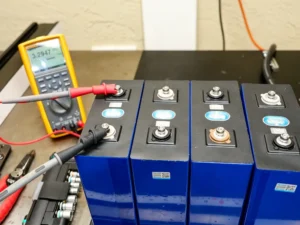
A digital multimeter is one of the easiest ways to check battery voltage. It has two probes, red and black. To use it, set the multimeter to DC voltage (V⎓). After that, choose a range that can handle your battery voltage. Place the red probe on the battery’s positive (+) terminal and the black probe on the negative (−) terminal. When done, the multimeter will display the battery’s current voltage on the screen.
2- Check the LiFePO4 Battery Monitor
The second option to check the voltage is to check the battery monitor. It is the best method for regularly tracking your battery. It continuously shows information such as voltage, current, and sometimes the estimated state of charge. You simply need to install it with your LiFePO4 battery and look at the monitor. It will continue to show the real-time voltage.
3- Check the BMS or LiFePO4 Battery Display

Today, many modern LiFePO4 batteries come with a built-in Battery Management System (BMS). This system monitors what is happening inside the battery. For example, it shows information such as voltage, charge level, current, and temperature. Most batteries have a small screen or a Bluetooth app that lets you check this information on your phone. You do not need to connect a multimeter to the battery terminals. You simply look at the display or open the battery app to see the voltage reading.
4- Check the Charge Controller or Inverter
If your LiFePO4 battery is connected to a solar charge controller or inverter, you can check its voltage directly from its display. These controllers or inverters monitor the battery while it is charging or supplying power and display its voltage. With these devices, you don’t need any extra measuring device like a multimeter. Some modern inverters even show the battery’s current, charging status, and estimated state of charge.
Frequently Asked Questions
Why Is the LiFePO4 Voltage Curve So Flat?
LiFePO4 batteries keep a fairly steady voltage through much of their charge cycle. This means the voltage does not drop quickly as the battery loses charge. That’s why these batteries can provide stable power, but it also makes voltage a less reliable indicator of exact charge.
Why 12.8V Does Not Always Mean 0%?
12.8V does not mean a 12V LiFePO4 battery is empty. In fact, around 12.8V still means that some useful charge remains in the battery. LiFePO4 batteries have a fairly flat voltage curve, so their voltage does not fall sharply as they discharge.
Why Voltage Alone Cannot Tell You the Exact SOC?
Voltage alone cannot tell you the exact state of charge (SOC). The reason is that LiFePO4 batteries keep a fairly steady voltage through much of their discharge cycle. Two batteries with different charge levels can, therefore, show almost the same voltage.
Conclusion
LiFePO4 batteries are among the most effective energy storage solutions for modern devices. However, when it comes to estimating their voltage, many get confused. That’s where the voltage chart for LiFePO4 batteries comes in handy, as I discuss in this guide. It is a quick way to see what your battery may be doing. The voltage indicates whether the battery is charging, working under a load, or running low.
Still, voltage does not tell the whole story. LiFePO4 batteries have a very stable voltage for much of their charge cycle. This makes them reliable, but it also makes it harder to know the exact charge level from voltage alone. That’s why you should use the voltage chart not as an exact battery meter. For more accurate voltage readings, you can check it with a multimeter, battery monitor, BMS, or inverter.